
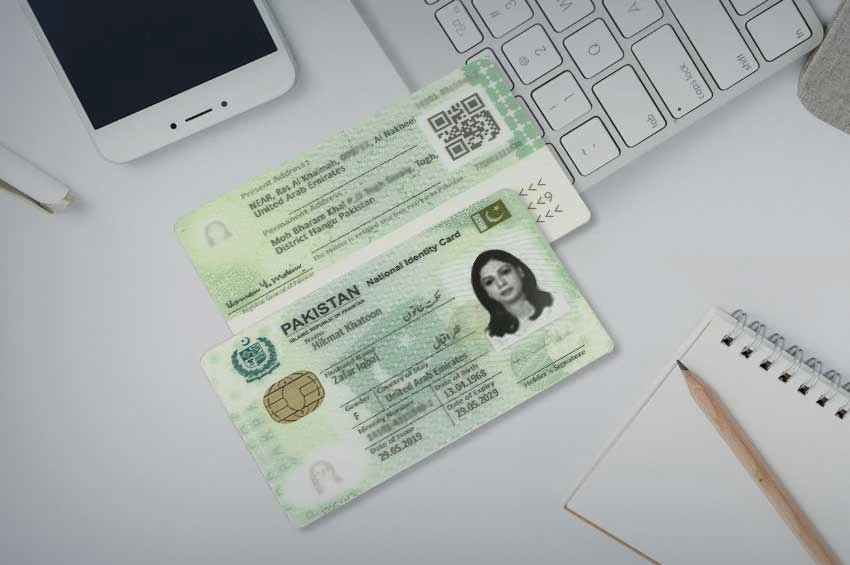
Pakistan’s most complete guide to checking every SIM registered on your CNIC. Official PTA-approved methods only. Free, instant, legally verified. Protect your identity before criminals do.
Check SIMs on Your CNIC Right Now — Fastest Method
Open Messages → Type your 13-digit CNIC without dashes → Send to 668 Receive complete SIM count per network in 30 seconds. Free.
What is a CNIC Tracker and Why Does Every Pakistani Need It
A CNIC Tracker in Pakistan’s context refers to any tool or method that allows you to check how many SIM cards are currently registered under your Computerized National Identity Card (CNIC) number across all mobile networks — Jazz, Zong, Telenor, Ufone, and SCOM.
This is not location tracking. This is not surveillance. This is identity protection — and in 2026, it is the single most important digital security action every Pakistani must take regularly.
Here is why it matters right now: Over 2.3 million Pakistanis currently have at least one unauthorized SIM card registered on their CNIC without their knowledge — confirmed by PTA in January 2026. These people have no idea. They will discover it only when:
- Their bank account is drained via intercepted OTPs
- An FIA officer arrives at their door because “their” SIM was used for fraud
- Their own legitimate SIM stops working because DIRBS blocked it automatically
The CNIC tracker methods in this guide take 30 seconds to use. Discovering and fixing SIM fraud can take months or years. The choice is yours.
Method 1 — SMS 668: Pakistan’s Official CNIC SIM Tracker
668 is PTA’s official CNIC SIM Information System — the most powerful free CNIC tracker available to every Pakistani citizen.
How to use:
- Open Messages app — any phone, feature phone or smartphone
- Type your 13-digit CNIC without dashes or spaces
- Example: 35201-1234567-1 → type
3520112345671 - Send to 668
- Receive complete results in 5–30 seconds
Sample result:
SIMs registered on CNIC: 35201XXXXXXXX1
Jazz / Mobilink: 2 SIMs
Zong (CMPak): 1 SIM
Telenor Pakistan: 1 SIM
Ufone (PTCL): 0 SIMs
SCOM: 0 SIMs
Total: 4 SIMs
How to read your result: Count every SIM card you personally own and use. If the 668 result shows more SIMs than you personally registered — unauthorized SIMs exist on your CNIC. Even one extra SIM is a critical security emergency.
| Feature | Details |
|---|---|
| Code | 668 |
| What to send | 13-digit CNIC (no dashes) |
| Cost | Rs. 2 + taxes |
| Free alternative | cnic.sims.pk |
| Response | 5–30 seconds |
| Networks covered | Jazz, Zong, Telenor, Ufone, SCOM |
| Internet needed | No |
| Works on | Any phone |
Method 2 — cnic.sims.pk: Free Online CNIC Tracker
cnic.sims.pk is PTA’s official free online CNIC tracker portal — zero cost, accessible from anywhere in the world, with registration date details not available via SMS.
How to use:
- Open any browser — mobile or desktop
- Visit cnic.sims.pk
- Enter your 13-digit CNIC
- Complete security CAPTCHA
- View all SIMs with network names and registration dates
Why cnic.sims.pk beats 668 for CNIC tracking:
- Zero cost — no SMS charges
- Shows exact registration dates — critical for proving unauthorized registration in legal proceedings
- Printable results — accepted by courts, banks, police stations
- Accessible from abroad — overseas Pakistanis can check their Pakistan CNICs remotely
- Visual display is easier to understand than SMS text
Best for: Legal documentation, zero-cost checking, overseas Pakistanis, court or bank evidence.
Method 3 — USSD Codes: Network-Specific CNIC Tracking
Each Pakistani network provides its own free USSD code for checking SIMs on your CNIC from that specific network.
| Network | USSD Code | What It Shows |
|---|---|---|
| Jazz | *321# | All Jazz SIMs on your CNIC |
| Zong | *310# | Zong account — SIM information |
| Telenor | *345# | Telenor SIM status |
| Ufone | *333# | All Ufone SIMs on your CNIC |
| SCOM | Via 668 or 1236 | SCOM SIMs on your CNIC |
When to use USSD codes instead of 668: USSD codes are network-specific and show only that network’s SIMs. Use them for quick verification of one specific network. Use 668 for the complete picture across all networks simultaneously.
9 Reasons Your CNIC Is Being Targeted for Unauthorized SIM Registration
Understanding how unauthorized SIM registration happens on your CNIC protects you from becoming a victim.
Reason 1 — CNIC Copies Without Watermarks Every time you submit a photocopy of your CNIC — to a bank, employer, landlord, school — that copy can potentially be misused. Fraudsters obtain CNIC copies from secondary sources and attempt SIM registration at dishonest franchise locations.
Reason 2 — Lost or Stolen CNIC A lost CNIC is a ticking time bomb. Within hours, fraudsters can attempt SIM registrations at remote franchise locations. Immediately file a police report and alert NADRA when your CNIC is lost.
Reason 3 — Natural Disasters and Displacement After floods, earthquakes, or other disasters, thousands of CNICs are lost or left in abandoned properties. Fraudsters in affected areas exploit this to register unauthorized SIMs.
Reason 4 — Old CNIC Copies in Inactive Accounts CNIC copies submitted years ago to closed bank accounts, old employers, or expired rental agreements remain in file rooms. Data breaches from these organizations can release your CNIC to fraudsters.
Reason 5 — Corrupt Franchise Employees PTA has shut down thousands of franchise locations for biometric bypass fraud. Some franchise employees process SIM registrations using stolen CNIC copies or biometric spoofing technology. Regular CNIC tracking catches this before damage occurs.
Reason 6 — CNIC Number Sharing Online Many Pakistanis share their CNIC number freely — for online marketplaces, freelancing platforms, or digital services. Exposed CNIC numbers combined with social engineering can be used for fraudulent SIM registration attempts.
Reason 7 — Deceased Family Member’s CNIC When a family member passes away, their CNIC remains valid for years unless formally cancelled at NADRA. Fraudsters target deceased persons’ CNICs because the real owner cannot check for unauthorized SIMs.
Reason 8 — Expired CNIC Exploitation An expired CNIC is more vulnerable to fraud because the owner may not be actively monitoring it. PTA data shows a disproportionate number of unauthorized SIM registrations occur on CNICs with expired validity dates.
Reason 9 — Children’s CNICs Minor children receive CNICs in Pakistan but rarely check their registration status. Fraudsters exploit this by registering SIMs on children’s CNICs — numbers that can remain undetected for years.
The Real Consequences of Unauthorized SIMs on Your CNIC
Every single one of these real consequences can and does happen to innocent Pakistanis whose CNICs are used for unauthorized SIM registration.
Financial Loss — Average Rs. 185,000 Per Victim Unauthorized SIMs are used to intercept mobile banking OTPs, bypass two-factor authentication on JazzCash and Easypaisa accounts, and drain savings. Pakistanis collectively lost Rs. 22.3 billion to SIM-related fraud in 2025.
Criminal Investigation Under Pakistani law, the registered CNIC holder is legally responsible for ALL activity on every SIM registered under their name. If criminals use your CNIC’s SIM for fraud, extortion, drug trafficking, or terrorism — FIA and police investigate you first. Proving you never registered that SIM requires extensive legal proceedings.
Wrongful Detention Several documented cases exist of innocent Pakistanis being detained by law enforcement because criminal SIM activity was traced back to their CNIC. Even after release, the legal clearance process takes months.
Automatic DIRBS Blocking of Your Legitimate SIM If unauthorized SIMs push your CNIC count over PTA’s limit on any operator — DIRBS automatically blocks all SIMs on that operator on your account. Your legitimate SIM stops working with zero warning. In an emergency, losing your phone connection can be catastrophic.
Credit History Damage Unauthorized SIMs linked to microfinance platforms (JazzCash, Easypaisa, UPaisa) can be used to take fraudulent loans in your name. Victims report 2–3 years of effort to clear fraudulent debt records and restore credit history.
Identity Theft Across Services Your mobile number tied to your CNIC is linked to your bank accounts, NADRA record, FBR tax record, and government service accounts. An unauthorized SIM on your CNIC is a master key to impersonate you across Pakistan’s entire digital infrastructure.
CNIC Tracker: What You Can and Cannot Do Legally
What is LEGALLY PERMITTED:
- Check all SIMs registered under YOUR OWN CNIC via 668, cnic.sims.pk, or USSD codes
- Verify the registered details of a SIM physically in your possession via MNP to 667
- Check all SIMs registered under a family member’s CNIC WITH THEIR CONSENT
- Use official PTA methods to verify SIMs for legitimate business purposes (employee verification with contract, customer verification with consent)
- Request law enforcement to check SIM registration details for crime investigation purposes (requires court order)
What is STRICTLY ILLEGAL under PECA 2016:
- Checking another person’s CNIC for SIM registrations without their consent
- Using any third-party tool or website to lookup another person’s SIM details by CNIC
- Purchasing or selling CNIC-linked SIM data
- Using SIM information for surveillance, stalking, or harassment
- Accessing another person’s private CNIC data through any unauthorized channel
Penalties for illegal SIM data access: Up to 3 years imprisonment and Rs. 1 million fine under PECA 2016. PTA and FIA actively investigate and prosecute violations.
Complete CNIC Tracker Action Plan — Monthly Security Routine
Protecting your CNIC from unauthorized SIM registration requires a consistent monthly routine. This takes under 5 minutes once set up.
Step 1 — Monthly 668 Check (1st of Every Month) Send your 13-digit CNIC to 668. Screenshot the result with date visible. Compare against your personal SIM inventory. If counts match — you are secure for this month.
Step 2 — BVS Verification (Every 3 Months) Check biometric verification status for each of your SIMs:
- Jazz: Send CNIC to 6001
- Telenor: Send CNIC to 7751
- Zong/Ufone: Send V to 7911
- Any network: Send MNP to 667
Step 3 — CNIC Copy Audit (Every 6 Months) Review which organizations currently hold copies of your CNIC. Destroy unnecessary copies. For all future CNIC copies, write “Only for [specific purpose] — Not for SIM issuance” across the copy in ink.
Step 4 — Annual cnic.sims.pk Check Visit cnic.sims.pk annually for full registration date details. Print and file the results as documentation.
Step 5 — Family CNIC Check (Quarterly) Check 668 for elderly parents, children with CNICs, and family members who do not regularly monitor their own registration. Elderly Pakistanis and children are disproportionately targeted for unauthorized CNIC registration.
If Your CNIC Shows Unauthorized SIMs — Complete Action Guide
Immediate Step 1 — Do Not Panic, But Act Within 24 Hours Screenshot the 668 result. Note which operator shows excess SIMs. Every hour of delay gives criminals more time to use the unauthorized SIM.
Step 2 — Identify the Specific Network 668 shows counts per operator. If Zong shows 3 SIMs but you own 1 Zong SIM — two unauthorized Zong SIMs exist. Send suspicious numbers to 76367 if you have them to confirm network.
Step 3 — Visit Franchise Immediately Bring original CNIC to the operator’s franchise. Request “SIM Disowning” using exactly those words. Complete biometric verification. Receive written reference number and receipt.
Step 4 — File PTA Complaint complaint.pta.gov.pk or call 0800-55055 (free 24/7). Include operator name, reference number from franchise, and discovery date.
Step 5 — File FIA Complaint if Fraud Occurred complaint.fia.gov.pk or call 9911. FIA has full authority to access complete SIM records and prosecute perpetrators under PECA 2016.
Step 6 — Protect Financial Accounts Contact your bank. Change JazzCash, Easypaisa, UPaisa PINs. Enable additional security on all accounts linked to your mobile number.
Step 7 — Alert NADRA If CNIC was lost or stolen, visit NADRA for replacement and fraud flagging immediately.
Network-Specific CNIC Tracker
For detailed CNIC tracking guides specific to each network:
- Jazz SIM Owner Details Pakistan 2026
- Zong SIM Owner Details Pakistan 2026
- Telenor SIM Owner Details Pakistan 2026
- Ufone SIM Owner Details Pakistan 2026
- SCOM SIM Owner Details Pakistan 2026
For all PTA SIM check codes visit PTA SIM Check Code Pakistan 2026.
For Pakistan’s free SIM verification tool visit Live Tracker Pakistan.
Frequently Asked Questions
What is a CNIC tracker in Pakistan 2026? A CNIC tracker in Pakistan refers to the official PTA methods that allow you to check all SIM cards registered under your CNIC number. The primary methods are: SMS your 13-digit CNIC to 668, visit cnic.sims.pk online portal, or dial network-specific USSD codes (*321# for Jazz, *333# for Ufone). These are the only legal CNIC trackers in Pakistan.
How do I check how many SIMs are on my CNIC in Pakistan? Send your 13-digit CNIC without dashes to 668 via SMS from any Pakistani phone. You will receive a complete count of SIMs per operator within 30 seconds. Alternatively visit cnic.sims.pk for free with registration dates included.
Is it free to check SIMs on my CNIC? 668 SMS costs Rs. 2 + taxes. cnic.sims.pk is completely free. USSD codes (*321#, *333#) are completely free. There is no need to pay any third-party website to track SIMs on your CNIC.
How many SIMs can be on one CNIC in Pakistan 2026? PTA allows maximum 5 voice SIMs per operator per CNIC across all 5 networks — 25 total voice SIMs maximum. Additionally, up to 3 data-only SIMs per operator are permitted. Exceeding any operator limit triggers automatic DIRBS blocking without warning.
What happens if I find unauthorized SIMs on my CNIC? Act immediately. Visit the relevant operator’s franchise with your original CNIC, request SIM Disowning, complete biometric verification, file PTA complaint at complaint.pta.gov.pk or call 0800-55055, and file FIA complaint at complaint.fia.gov.pk if fraud occurred.
Can I check someone else’s CNIC for SIM registrations? No. Checking another person’s CNIC for SIM registrations without their consent is illegal under PECA 2016 — punishable by up to 3 years imprisonment and Rs. 1 million fine. You may only check your own CNIC or a family member’s CNIC with their explicit consent.
How often should I track SIMs on my CNIC? PTA recommends checking at minimum every 3 months. Security experts recommend monthly checks via 668 on the 1st of every month. If your CNIC was ever lost, stolen, or shared without watermark — check immediately and then monthly thereafter.
Disclaimer: livetracker.org.pk operates strictly within Pakistan’s legal framework under PTA regulations and PECA 2016. This guide provides information on official PTA CNIC verification methods for legitimate personal identity protection only. Checking another person’s CNIC data without authorization is illegal under PECA 2016.
 LIVE TRACKER
3 thoughts on “CNIC Tracker Pakistan 2026 — Check All SIMs on Your CNIC Free & Instantly”